[GDS] Geospatial Data Science 101: 5 Future Trends That Will Shape Geospatial Data Science


Introduction

Geospatial Data Science is evolving at a rapid pace. Advances in AI, real-time data, and cloud computing are transforming how we collect, analyze, and use location intelligence.

From autonomous mapping drones to GeoAI-powered predictive analytics, the future of geospatial science is exciting and full of possibilities.

In this article, we’ll explore 5 key trends shaping the future of GIS and how they will impact industries like retail, transportation, climate science, and urban planning.


1️⃣ AI and Machine Learning in GIS (GeoAI)

Artificial Intelligence (AI) is making geospatial analysis smarter and more automated.

📊 How AI is Changing GIS:
Automated Image Classification — AI detects land cover, deforestation, and urban expansion.
Predictive Spatial Modeling — Forecasting climate trends, real estate values, and consumer behavior.
Object Detection — Identifying cars, ships, or infrastructure in satellite imagery.

💡 Example: NASA uses AI-powered GIS to monitor deforestation in the Amazon Rainforest by analyzing satellite images.

🚀 Future Outlook: AI-powered real-time geospatial analytics will soon help cities predict traffic congestion and natural disasters before they happen!


2️⃣ Real-Time GIS & Live Data Streaming

GIS is shifting from static maps to real-time dynamic systems, allowing businesses and governments to make instant decisions.

📊 How Real-Time GIS is Used:
Live Traffic Monitoring — Used by ride-sharing services like Uber.
Disaster Response — Mapping wildfires, hurricanes, and floods as they happen.
Smart Cities — Adjusting traffic signals & public transport routes based on real-time congestion data.

💡 Example: The California Wildfire Tracker uses real-time GIS data to provide emergency updates.

🚀 Future Outlook: Expect 5G-powered GIS systems that allow businesses to track supply chains, weather changes, and security risks in real time.


3️⃣ 3D GIS & Digital Twins

Traditional GIS is 2D, but the future is 3D and beyond!

📊 How 3D GIS is Transforming Industries:
Urban Planning — Digital twins of cities help optimize building placements & infrastructure.
Environmental Science — 3D models predict the impact of climate change, floods, and sea level rise.
Military & Defense — Simulating battlefield environments for strategic planning.

💡 Example: Singapore created a nationwide 3D Digital Twin to improve urban planning and sustainability.

🚀 Future Outlook: In the next decade, we’ll see full-scale 3D digital replicas of entire cities, updated in real time.


4️⃣ Cloud GIS & Big Data Analytics

With massive geospatial datasets being generated daily, businesses are moving GIS operations to the cloud.

📊 How Cloud GIS is Changing the Game:
Faster Processing — No need for high-end computers; cloud GIS runs heavy analysis remotely.
Scalable Solutions — Businesses analyze global movement patterns without storage limits.
Collaborative Mapping — Teams access GIS data from anywhere, anytime.

💡 Example: Google Earth Engine allows scientists to analyze petabytes of satellite imagery in the cloud.

🚀 Future Outlook: Cloud-based GIS + AI models will provide on-demand predictive analytics for businesses, governments, and researchers.


5️⃣ Augmented Reality (AR) & GIS

AR + GIS will revolutionize navigation, tourism, and fieldwork.

📊 How AR is Changing GIS:
AR Navigation — Google Maps overlays real-time directions on smartphone cameras.
AR City Planning — Architects visualize 3D buildings on-site before construction.
AR Field Surveys — Fieldworkers analyze real-world locations using smart glasses.

💡 Example: Archaeologists use AR-powered GIS apps to overlay historical maps onto modern landscapes.

🚀 Future Outlook: AR glasses will soon replace paper maps, allowing users to interact with real-time GIS layers on the go!


Conclusion: The Future of GIS is Here!

The geospatial industry is advancing faster than ever.

AI-powered GIS will make spatial analysis smarter.
Real-time GIS will allow instant decision-making.
3D & Digital Twins will change how we plan cities.
Cloud GIS will process massive datasets in seconds.
AR GIS will make maps more interactive than ever.


🔗 Useful Resources & Links

Originally published on Medium.
[GDS] Geospatial Data Science 101: The Dark Side of Location Data: Privacy and Ethical Concerns in GIS


Introduction

Every time you use a navigation app, check the weather, or shop online, your location data is being collected. Businesses and governments use Geographic Information Systems (GIS) to improve services, but at what cost?

While GIS has transformed industries like retail, transportation, and healthcare, it also raises serious privacy and ethical concerns. How much do companies really know about our movements? And are we willingly giving away too much information?

In this article, we’ll explore:
✅ How location data is collected
✅ The risks of geospatial tracking
✅ The ethical challenges of GIS
✅ How we can protect our privacy


1️⃣ How Location Data is Collected

Location data comes from multiple sources, often without users fully realizing it.

📌 Common Location Data Sources:
Mobile Apps — Social media, fitness trackers, weather apps.
GPS Devices — Smartphones, smartwatches, car navigation.
Wi-Fi & Bluetooth Signals — Stores track foot traffic via Wi-Fi.
CCTV & Drones — Cities monitor public spaces.
Credit Card Transactions — Banks log locations of purchases.

💡 Example: A grocery store uses Wi-Fi tracking to analyze customer movement patterns and optimize store layout.


2️⃣ The Risks of Location Tracking

🔹 1. Loss of Personal Privacy

Many apps collect precise location data, even when they don’t need it.

📌 Risk: Your daily routines (home, work, gym) are tracked and stored, creating a detailed digital footprint.

💡 Example: A weather app was found selling user location data to third-party advertisers without consent.


🔹 2. Selling & Misusing Location Data

Your location data is valuable — it’s often bought and sold without your knowledge.

📌 Risk: Companies collect data from apps and sell it to advertisers, insurance firms, or law enforcement.

💡 Example: A ride-sharing app sold anonymous location data to real estate developers for market analysis.


🔹 3. Government Surveillance & Tracking

Governments use GIS & big data to monitor citizens, sometimes crossing ethical lines.

📌 Risk: Increased mass surveillance, predictive policing, and loss of anonymity.

💡 Example: Some cities use AI-powered CCTV + GIS to track individuals’ movements in real-time.


🔹 4. Location Data & Cybersecurity Risks

📌 Risk: If a database of geolocation data is hacked, sensitive travel patterns, home addresses, and business locations can be exposed.

💡 Example: A fitness tracking app accidentally revealed the locations of military bases, as soldiers’ jogging routes were mapped online.


3️⃣ Ethical Challenges in GIS & Location Data

Using GIS responsibly requires ethical considerations:

Consent & Transparency — Are users informed when their location is being tracked?
Data Ownership — Who controls collected location data — users or companies?
Bias & Discrimination — Does GIS reinforce inequality (e.g., redlining in real estate)?
Security — Is sensitive geospatial data properly protected?

💡 Example: Some insurance companies charge higher rates based on ZIP codes, which can reinforce economic inequality.


4️⃣ How to Protect Your Location Privacy

🔹 1. Turn Off Unnecessary Location Services
📌 Solution: Disable location tracking for apps that don’t need it (e.g., weather apps).

🔹 2. Use a VPN
📌 Solution: Hide your IP address to prevent location-based tracking.

🔹 3. Read App Privacy Policies
📌 Solution: Check if an app shares or sells your location data.

🔹 4. Disable Wi-Fi & Bluetooth When Not in Use
📌 Solution: Prevent retail stores from tracking your phone’s signals.

🔹 5. Choose Privacy-Focused Maps
📌 Solution: Use open-source maps like OpenStreetMap instead of commercial services that log your data.

💡 Example: Some privacy-conscious users prefer DuckDuckGo Maps over Google Maps to avoid data tracking.


5️⃣ The Future of Ethical GIS

As GIS technology evolves, governments and businesses must:
✅ Implement stronger data protection laws.
✅ Use anonymous geospatial data whenever possible.
✅ Be transparent about data collection & sharing.

🚀 Emerging Trends:
✅ AI-driven privacy filters for location data.
✅ Increased use of blockchain for secure GIS data storage.
✅ Stricter GDPR-style privacy laws worldwide.

💡 Example: Apple’s iOS now requires apps to ask for location tracking permissions, giving users more control.


Conclusion: Balancing Innovation & Privacy

GIS is revolutionizing industries, but it must be used responsibly.

Location data is powerful, but also risky.
Businesses and governments must ensure ethical use.
Users should take steps to protect their own privacy.


🔗 Useful Resources & Links

Originally published on Medium.
[GDS] Geospatial Data Science 101: How Companies Use GIS for Smarter Business Decisions


Introduction

Location matters in business. Whether it’s choosing the perfect store location, optimizing delivery routes, or targeting the right customers, Geographic Information Systems (GIS) play a crucial role in modern business intelligence.

GIS isn’t just about maps — it’s about data-driven decision-making. By analyzing location data, businesses can gain valuable insights, improve efficiency, and gain a competitive advantage.

In this article, we’ll explore:
✅ How businesses use GIS for decision-making
✅ Key GIS applications in different industries
✅ Real-world examples of GIS success in business


1️⃣ Why GIS is a Game Changer for Business

Traditional business analytics rely on sales reports, customer surveys, and spreadsheets. But GIS adds a powerful spatial dimension, answering questions like:

📌 Where are our best customers located?
📌 Which delivery routes are the most efficient?
📌 Where should we open our next store?
📌 How does weather impact our sales?

💡 Example: A fast-food chain uses GIS to analyze customer foot traffic and identify high-potential locations for new restaurants.


2️⃣ Top Business Applications of GIS

🔹 1. Site Selection & Market Expansion

Choosing the right location is critical for retail, restaurants, and real estate.

📊 How GIS Helps:
✅ Analyzes population density & income levels.
✅ Identifies competitor locations.
✅ Uses drive-time analysis to determine accessibility.

💡 Example: Starbucks uses GIS to predict store performance based on foot traffic, demographics, and economic trends.


🔹 2. Customer Demographics & Targeted Marketing

Understanding who your customers are and where they live helps businesses run more effective marketing campaigns.

📊 How GIS Helps:
✅ Segments customers based on location, income, and behavior.
✅ Identifies high-value neighborhoods for advertising.
✅ Optimizes billboard and digital ad placements.

💡 Example: A clothing brand uses GIS to map customer purchases and target ads to high-spending areas.


🔹 3. Supply Chain & Logistics Optimization

Companies rely on GIS to streamline shipping, deliveries, and supply chains.

📊 How GIS Helps:
✅ Optimizes warehouse placement based on demand.
✅ Identifies the fastest and cheapest delivery routes.
✅ Uses real-time tracking to monitor shipments.

💡 Example: Amazon uses GIS + AI to predict package delivery times and adjust routes dynamically based on traffic and weather conditions.


🔹 4. Risk Management & Disaster Planning

GIS helps businesses assess risks and plan for natural disasters, economic downturns, and supply chain disruptions.

📊 How GIS Helps:
✅ Identifies flood zones, wildfire risks, and earthquake-prone areas.
✅ Maps historical weather patterns to predict impact on sales.
✅ Supports emergency response planning.

💡 Example: Insurance companies use GIS to assess flood risk levels and set policy rates accordingly.


3️⃣ How Businesses Use GIS Data Sources

Businesses integrate GIS with big data sources such as:
Census Data — Customer demographics & income levels.
Satellite Imagery — Land-use changes & environmental risks.
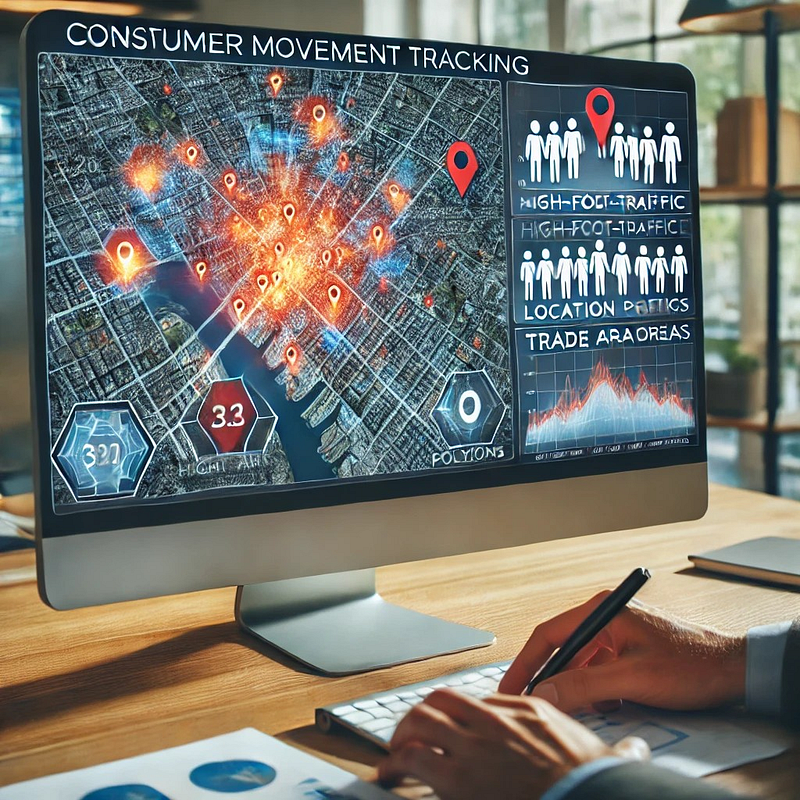
Mobile GPS Data — Consumer movement tracking.
Weather & Climate Data — Forecasting business impact.

💡 Example: A ski resort uses GIS weather data to predict snowfall and optimize ticket pricing.


4️⃣ Real-World Example: How McDonald’s Uses GIS for Site Selection

McDonald’s has over 40,000 locations worldwide — but how do they choose where to open a new restaurant?

📌 How McDonald’s Uses GIS:
Analyzes customer traffic patterns (who visits & where they come from).
Uses demographic data (income, family size, eating habits).
Studies competitor presence (avoiding oversaturation).
Performs drive-time analysis (how far customers travel for food).

Result? Smarter store placement, higher sales, and faster expansion!


5️⃣ How to Get Started with GIS for Business

1️⃣ Identify Your Business Question — Do you need help with site selection? Logistics? Marketing?
2️⃣ Collect & Analyze Data — Use census data, sales reports, GPS tracking, and more.
3️⃣ Visualize Insights with GIS Maps — Heatmaps, trade area analysis, and spatial clustering.
4️⃣ Automate GIS Workflows — Use Python (ArcPy, GeoPandas) to streamline processes.
5️⃣ Make Data-Driven Decisions — Use GIS insights to improve business strategies.

💡 Example: A startup uses GIS + Python to automate customer location analysis, reducing research time from weeks to minutes!


Conclusion: GIS = Smarter Business Decisions

GIS is no longer optional — it’s a must-have for businesses looking to:
Optimize store locations
Improve logistics & deliveries
Target the right customers
Assess risks & make smarter decisions


🔗 Useful Resources & Links

Originally published on Medium.

[GDS] Geospatial Data Science 101: How to Build an Interactive Map in 10 Minutes Using Python


Introduction

Static maps are great, but interactive maps take spatial data visualization to the next level! Instead of just looking at a map, users can zoom, click, filter, and explore the data dynamically.

Python makes it easy to create interactive maps using libraries like Folium, Plotly, and Leaflet.js. Whether you’re mapping store locations, crime hotspots, or population trends, interactive maps provide a better user experience.

In this article, we’ll cover:
✅ Why interactive maps are useful
✅ The best tools for building them
✅ A step-by-step Python tutorial to create an interactive web map


1️⃣ Why Use Interactive Maps?

Unlike static maps, interactive maps allow users to:
Zoom & Pan — Navigate through different locations.
Click on Markers — Get additional information.
Toggle Layers — View different datasets dynamically.
Filter Data — Customize map views based on user preferences.

💡 Example: A real estate website lets users click on house icons to see property details (price, size, location).


2️⃣ Best Python Libraries for Interactive Mapping

🔹 Folium (Best for Web Maps)

  • Built on Leaflet.js, one of the most popular web mapping frameworks.
  • Simple Python interface for adding markers, popups, and heatmaps.
  • Exports maps as HTML files for easy sharing.

🔹 Plotly (Best for Interactive Data Dashboards)

  • Allows hover effects, filters, and 3D visualizations.
  • Works well for business intelligence dashboards.

🔹 Geopandas + Shapely (Best for Vector Data Processing)

  • Handles shapefiles, GeoJSON, and spatial joins before mapping.

💡 Example: A company can use Folium + Geopandas to map customer locations and identify sales trends by region.


3️⃣ Step-by-Step: Create an Interactive Map with Python (Folium)

🔹 Step 1: Install Folium

First, install Folium using pip:

pip install folium

🔹 Step 2: Create a Basic Interactive Map

Open a Python script and add:

import folium

# Create a map centered on New York City
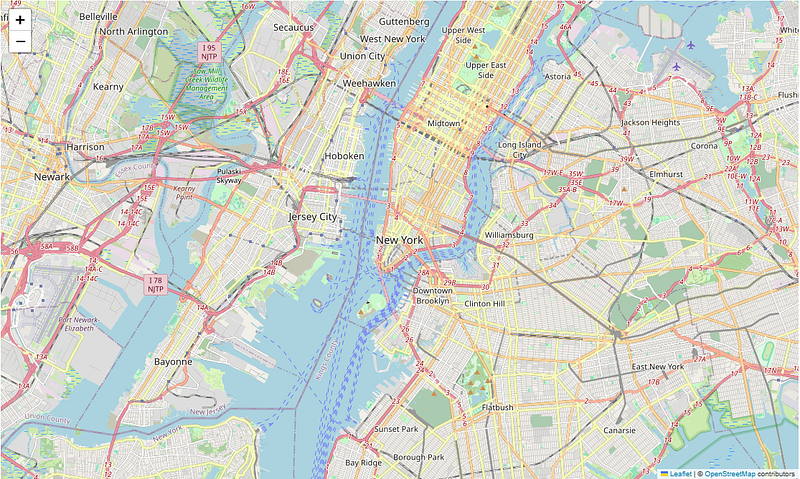
m = folium.Map(location=[40.7128, -74.0060], zoom_start=12)

# Show the map
m

# optional code
m.save("interactive_map.html")
print("Interactive map created successfully!")

Output: A basic map centered on New York City!


🔹 Step 3: Add Markers for Locations

Let’s add some store locations to our interactive map:

# Add store locations with popup labels
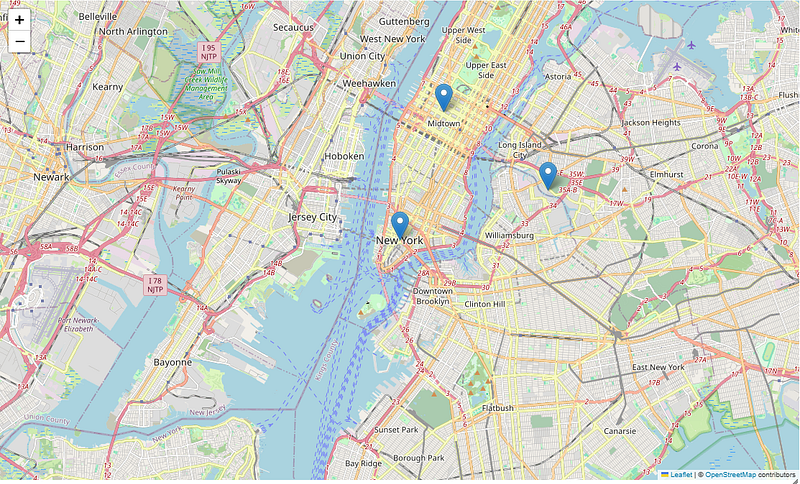
folium.Marker([40.730610, -73.935242], popup="Store A").add_to(m)
folium.Marker([40.758896, -73.985130], popup="Store B").add_to(m)
folium.Marker([40.712776, -74.005974], popup="Store C").add_to(m)

# Show the map
m

Output: Clicking on markers displays store details!


🔹 Step 4: Add a Heatmap (Optional)

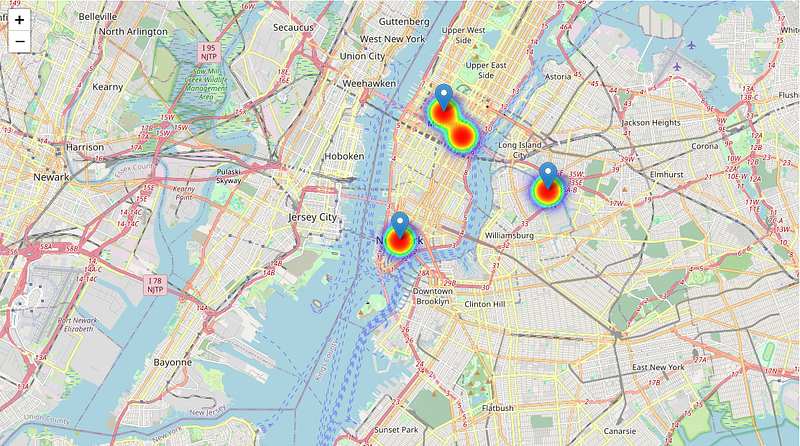
If you have customer location data, you can visualize density using a heatmap.

First, install the Heatmap plugin:

pip install branca

Then, modify your Python script:

from folium.plugins import HeatMap

# Sample customer locations (latitude, longitude)
customer_data = [
[40.730610, -73.935242],
[40.758896, -73.985130],
[40.712776, -74.005974],
[40.750500, -73.976250]
]

# Add heatmap layer
HeatMap(customer_data).add_to(m)

# Show the map
m

Output: A heatmap showing customer density in different areas.


4️⃣ How to Deploy & Share Your Interactive Map

Once you’ve created your HTML map, you can:
Embed it in a website (perfect for businesses).
Share the file with team members for data insights.
Host it on GitHub Pages or a personal server.

💡 Example: A tourism website embeds an interactive map of attractions to help visitors explore a city.


5️⃣ Common Mistakes to Avoid in Interactive Mapping

Not choosing the right map projection — Can lead to distorted views.
Adding too much data at once — Can slow down performance.
Forgetting to test across devices — Make sure it works on mobile & desktop.
Ignoring user experience (UX) — Keep maps clean and simple.

💡 Example: A poorly designed map with too many layers can confuse users instead of helping them.


Conclusion: Why You Should Use Interactive Maps

Engage users with clickable locations & filters.
Improve decision-making with heatmaps & data layers.
Easily share maps without GIS software.


🔗 Useful Resources & Links

Originally published on Medium.

[GDS] Geospatial Data Science 101: How AI is Changing the Future of Geospatial Analysis


Introduction

Artificial Intelligence (AI) is transforming nearly every industry, and Geospatial Data Science is no exception. From real-time mapping to predictive analytics, AI is making GIS faster, smarter, and more powerful than ever before.

But how exactly is AI being used in geospatial analysis? And what does this mean for the future of location intelligence?

In this article, we’ll explore:
✅ The role of AI in GIS
✅ How AI improves spatial data analysis
✅ Real-world applications of AI in geospatial science
✅ The future of AI-powered GIS


1️⃣ What is AI in Geospatial Analysis?

AI in GIS refers to using machine learning (ML) and deep learning (DL) algorithms to analyze, predict, and automate geospatial tasks.

📌 AI Helps GIS By:

  • Automating manual tasks (e.g., land cover classification).
  • Detecting patterns & trends in large datasets.
  • Predicting future scenarios (e.g., traffic congestion, climate impact).
  • Processing big geospatial data faster than traditional GIS methods.

💡 Example: Instead of manually classifying satellite images, AI models can automatically detect forests, urban areas, and water bodies in seconds!


2️⃣ How AI is Enhancing GIS Analysis

🔹 1. Deep Learning for Image Classification

AI can analyze satellite images and drone footage to identify objects and changes over time.

📊 Best for:

  • Detecting deforestation and land-use change
  • Identifying vehicles, buildings, and infrastructure
  • Analyzing natural disasters (floods, wildfires, hurricanes)

💡 Example: NASA uses AI-powered image classification to track global urban expansion and deforestation trends.


🔹 2. AI-Powered Predictive Modeling

AI can predict future spatial patterns based on historical geospatial data.

📊 Best for:

  • Predicting traffic congestion in smart cities
  • Forecasting real estate price trends
  • Modeling climate change impact

💡 Example: Uber and Google Maps use AI-powered GIS models to predict travel times and optimize routes in real time.


🔹 3. Automated Feature Extraction

AI can automatically identify roads, rivers, and buildings from aerial and satellite images.

📊 Best for:

  • Updating digital maps (Google Maps, OpenStreetMap)
  • Extracting infrastructure features for urban planning
  • Monitoring construction growth from satellite imagery

💡 Example: AI helps disaster response teams quickly map damaged roads and bridges after an earthquake.


🔹 4. AI for Object Detection in GIS

Using computer vision, AI can recognize cars, ships, trees, and other objects in imagery.

📊 Best for:

  • Tracking illegal fishing vessels
  • Monitoring wildlife populations
  • Counting cars in parking lots for retail analytics

💡 Example: AI-powered drones track deforestation and illegal mining activity in the Amazon rainforest.


🔹 5. Real-Time GIS & AI for Smart Cities

AI + GIS enables real-time geospatial analytics, helping cities manage:
Traffic & transportation
Public safety (crime detection, emergency response)
Urban planning & zoning

💡 Example: AI-powered GIS helps predict & prevent traffic jams in smart cities like Singapore and Dubai.


3️⃣ How AI Works in GIS: Tools & Techniques

AI-powered GIS uses several Python libraries and tools:

ArcGIS Deep Learning Tools — Built-in AI models for spatial analysis.
Google Earth Engine — AI-powered satellite image processing.
TensorFlow & PyTorch — AI frameworks for geospatial deep learning.
Scikit-learn & XGBoost — Machine learning for predictive modeling.
OpenCV — Computer vision for image classification.

🔹 Example: AI-Powered Land Cover Classification in Python

import tensorflow as tf
import rasterio
import numpy as np

# Load satellite image
with rasterio.open("satellite_image.tif") as src:
img = src.read()

# Load AI model for land cover classification
model = tf.keras.models.load_model("landcover_model.h5")

# Predict land cover types
predictions = model.predict(np.expand_dims(img, axis=0))
print("AI-powered land cover classification completed!")

Automatically classifies land into forests, urban areas, and water bodies!


4️⃣ The Future of AI-Powered GIS

🚀 AI is making GIS:
More automated — Reducing human effort in geospatial analysis.
More predictive — Anticipating future trends & disasters.
More real-time — Live location tracking & decision-making.

📌 Emerging Trends in AI + GIS:

  • AI-generated 3D maps for urban planning.
  • Autonomous GIS mapping drones for real-time surveillance.
  • GeoAI-powered Chatbots for interactive location intelligence.

💡 Example: Future AI models may automatically update global maps in real time using satellite feeds.


Conclusion: AI is Revolutionizing GIS

AI is reshaping the way we analyze geospatial data, making GIS smarter, faster, and more insightful.

✅ AI helps classify satellite images faster.
✅ AI predicts spatial trends with high accuracy.
✅ AI automates data processing and feature extraction.


🔗 Useful Resources & Links

Originally published on Medium.

[GDS] Geospatial Data Science 101: Why Spatial Data Visualization is a Game Changer


Introduction

We live in an era of big data, where numbers and statistics flood our screens daily. But raw data alone isn’t useful — it needs to be visualized to be understood.

That’s where spatial data visualization comes in. By turning location-based data into maps, heatmaps, and interactive dashboards, GIS professionals can reveal hidden patterns, make better decisions, and tell compelling stories.

In this article, we’ll explore:
✅ Why spatial data visualization matters
✅ The best ways to visualize spatial data
✅ Tools for effective GIS mapping
✅ Common mistakes to avoid


1️⃣ Why Spatial Data Visualization Matters

A well-designed map can simplify complex data, helping users quickly grasp insights that tables and reports can’t convey.

📌 Benefits of Spatial Data Visualization:
Improves Decision-Making — Businesses use maps to optimize store locations.
Reveals Patterns & Trends — Crime heatmaps show high-risk areas.
Enhances Communication — Governments use maps for disaster response.
Engages & Educates Audiences — Climate change maps inform the public.

💡 Example: A retail chain uses GIS heatmaps to identify high-foot-traffic areas, helping them place new stores in prime locations.


2️⃣ Best Ways to Visualize Spatial Data

🔹 1. Heatmaps (Density Maps)

Heatmaps use color gradients to highlight areas of high or low concentration.

📊 Best for:

  • Customer foot traffic analysis
  • Crime hotspot mapping
  • Environmental changes (air pollution, deforestation)

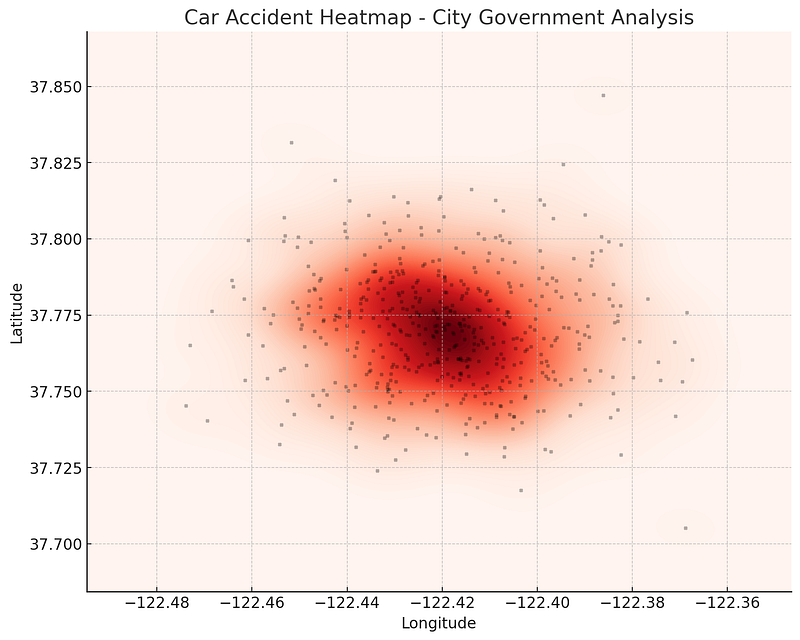
💡 Example: A city government uses heatmaps to pinpoint areas with the most car accidents, helping them improve road safety.


🔹 2. Choropleth Maps (Color-Coded Maps)

Choropleth maps use different shades of color to represent data values across regions.

📊 Best for:

  • Population density visualization
  • Election results (red vs. blue states)
  • Income distribution

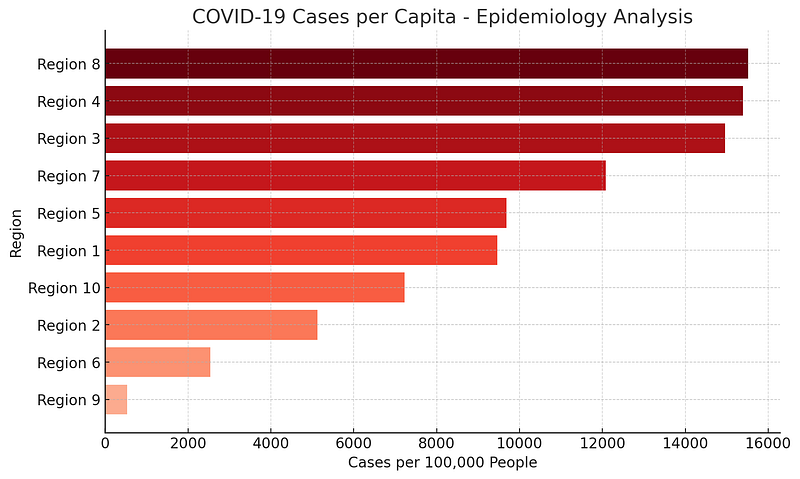
💡 Example: A public health agency creates a COVID-19 case distribution map, using darker shades for areas with higher infections.


🔹 3. Proportional Symbol Maps

Instead of colors, symbol sizes represent data values (e.g., larger circles for bigger populations).

📊 Best for:

  • Mapping store locations by revenue
  • Visualizing earthquake magnitudes
  • Showing business market share

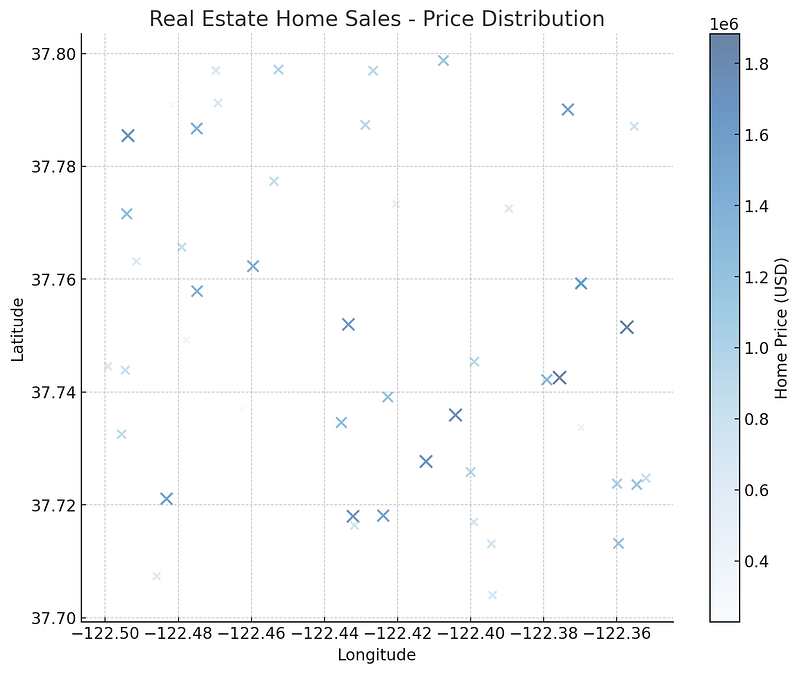
💡 Example: A real estate firm maps home sales using larger circles for higher-value properties.


🔹 4. Flow Maps (Movement & Migration Patterns)

Flow maps use arrows or lines to show how people, goods, or data move.

📊 Best for:

  • Migration trends
  • Trade route analysis
  • Supply chain logistics

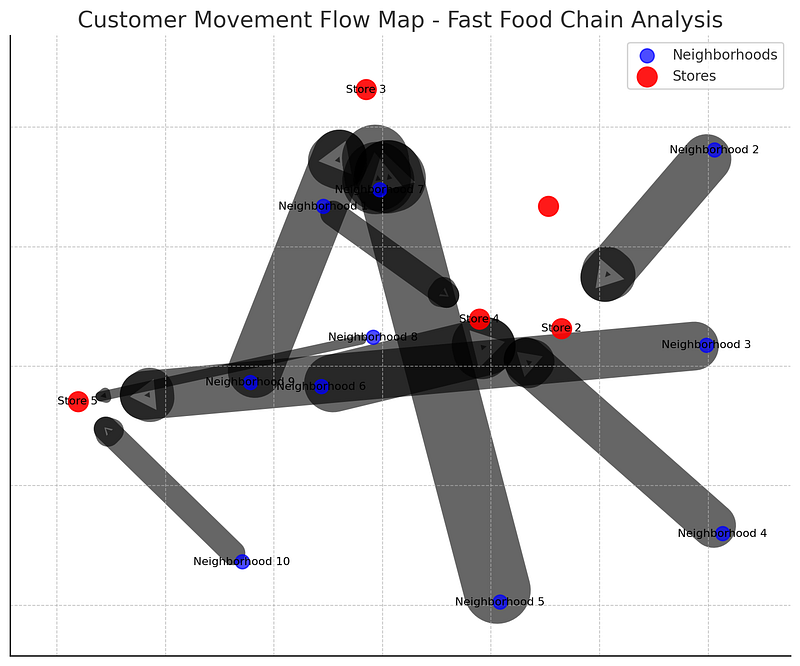
💡 Example: A fast-food chain maps customer movement from home neighborhoods to store locations to understand shopping behavior.


🔹 5. 3D GIS & Digital Twins

3D GIS allows users to analyze spatial data in three dimensions, making it useful for:
📊 Best for:

  • City planning (visualizing building heights)
  • Underground infrastructure mapping
  • Environmental impact analysis

💡 Example: A city planner uses 3D GIS to simulate urban expansion, helping them plan better zoning policies.


3️⃣ Tools for Effective Spatial Data Visualization

ArcGIS Pro (Best for Professional Mapping)

🔹 Industry-standard GIS software for high-quality maps.
🔹 Supports 3D visualization, spatial analytics, and real-time mapping.

QGIS (Best Open-Source Alternative)

🔹 Free GIS tool for choropleth maps, heatmaps, and spatial joins.
🔹 Works with various spatial data formats.

Python (For Automated Mapping & Interactive Visualizations)

🔹 Folium — Creates interactive web maps.
🔹 Matplotlib & Geopandas — Custom data-driven maps.
🔹 ArcPy — Automates map creation in ArcGIS Pro.

Example: Creating an Interactive Web Map with Python (Folium)

import folium

# Create a basic map centered on New York City
m = folium.Map(location=[40.7128, -74.0060], zoom_start=12)


# Add a marker for a store location
folium.Marker([40.730610, -73.935242], popup="Store A").add_to(m)


# Save map as HTML
m.save("map.html")
print("Interactive map created successfully!")

Result? A clickable, interactive web map showing store locations.


4️⃣ Common Mistakes to Avoid in Spatial Data Visualization

Using Too Many Colors — Makes maps hard to read.
Ignoring Projection Issues — Wrong coordinate systems lead to distortion.
Overloading with Data — Keep maps simple & focused.
Lack of Context — Provide legends and labels to guide viewers.

💡 Example: A poorly designed population density map with random colors can confuse readers instead of informing them.


Conclusion: The Power of Spatial Data Visualization

Effective spatial data visualization turns raw location data into actionable insights.

Heatmaps reveal density patterns.
Choropleth maps simplify comparisons.
3D GIS enhances city planning.
Python automates interactive mapping.


🔗 Useful Resources & Links

  • 📊 Learn ArcGIS Visualization Tools
  • 🗺 QGIS Heatmap Tutorial
  • 🎥 Python GIS Visualization Tutorials

Originally published on Medium.

[GDS] Geospatial Data Science 101: How Businesses Use GIS to Track Consumer Movement


Introduction

Have you ever noticed how new fast-food restaurants, coffee shops, or retail stores seem to pop up in just the right places? This isn’t luck — it’s data-driven decision-making powered by Geographic Information Systems (GIS) and consumer movement data.

Businesses today are using geospatial analytics to understand where people go, how they move, and what influences their choices. This insight helps them optimize store locations, marketing strategies, and logistics.

Let’s explore how GIS is revolutionizing consumer movement analysis and why it matters for businesses.


1️⃣ What is Consumer Movement Data?

Consumer movement data refers to location-based insights collected from:

  • 📍 Mobile GPS & App Data (tracking foot traffic patterns).
  • 📡 WiFi & Bluetooth Signals (detecting device presence in stores).
  • 🛰 Satellite & Aerial Imagery (analyzing urban movement trends).
  • 🚗 Transportation Data (public transit, ride-sharing patterns).

Businesses use this anonymized data to answer questions like:

  • Where do potential customers live, work, and shop?
  • How far are they willing to travel for a purchase?
  • Which competitor locations get more traffic?

💡 Example: A fast-food chain can track where customers go before and after visiting their restaurant, helping them choose better locations for expansion.


2️⃣ How Businesses Use GIS for Consumer Movement Analysis

🔹 1. Site Selection: Finding the Best Store Locations

Opening a new store is a huge investment — picking the wrong location can be costly. Businesses use GIS to:

  • Analyze foot traffic density to find high-traffic zones.
  • Identify customer demographics (age, income, spending habits).
  • Assess competitor proximity (too close = high competition, too far = missed opportunity).

📍 Example: Starbucks uses GIS to analyze morning commute patterns, ensuring stores are placed along busy work routes.


🔹 2. Trade Area Mapping: Understanding Customer Reach

A trade area is the region where most of a store’s customers live or work. Businesses use GIS to:

  • Draw buffer zones (e.g., 5-mile radius around a store).
  • Use drive-time analysis to estimate how far people will travel.
  • Identify customer leakage (areas where customers go elsewhere).

📍 Example: A supermarket chain uses GIS-based heatmaps to visualize which neighborhoods shop at their store vs. competitors.


🔹 3. Competitive Intelligence: Tracking Rivals’ Success

Businesses don’t just analyze their own locations — they monitor competitor movement data too.

  • GIS helps map competing store locations and customer flow.
  • Businesses analyze which brands attract more visitors.
  • Insights help adjust pricing, promotions, and store placement.

📍 Example: A gym brand tracks foot traffic around competitor gyms to identify untapped neighborhoods for expansion.


🔹 4. Consumer Behavior Prediction: Forecasting Demand

Predictive modeling + GIS helps businesses anticipate future customer trends.

  • Machine learning models analyze movement patterns.
  • Stores can forecast demand and adjust inventory.
  • Retailers optimize marketing campaigns based on real-time movement.

📍 Example: A clothing brand uses GIS to target ads in neighborhoods where shoppers frequently visit competitor stores.


3️⃣ How GIS Tools Analyze Consumer Movement

Businesses use GIS software and Python libraries to process movement data.

🔹 ArcGIS Pro & QGIS (GIS Software)

ArcGIS Pro — Advanced consumer movement mapping
QGIS — Free, open-source alternative

💡 Example: A GIS analyst uses ArcGIS Pro’s Hot Spot Analysis to find high-foot-traffic areas for a new café.


🔹 Python for Movement Data Analysis

Python helps automate consumer movement analysis.

Example: Automating Movement Data Processing in ArcGIS Pro

import arcpy

# Input movement dataset
input_points = "C:/GIS/movement_data.shp"

# Perform Kernel Density Estimation
output_density = "C:/GIS/movement_density.tif"
arcpy.sa.KernelDensity(input_points, None, output_density, 100)
print("Density analysis completed!")

🔹 Results? Businesses visualize foot traffic density to pinpoint ideal store locations.


4️⃣ Ethical Considerations in Consumer Movement Tracking

While movement data is valuable, businesses must handle it ethically.

  • Anonymization — No personal identification.
  • Transparency — Inform users if data is collected.
  • Privacy Compliance — Follow regulations (GDPR, CCPA).

💡 Example: Apple & Google ensure mobile tracking is opt-in only to protect user privacy.


Conclusion: The Future of GIS in Consumer Analytics

The way businesses track customer movement is evolving rapidly. Real-time GIS, AI-powered analytics, and interactive mapping will make decision-making even smarter.


🔗 Useful Resources & Links

Originally published on Medium.